DeltaMath Login Guide
DeltaMath is a web-based math practice platform used by teachers and students across middle and high school. Teachers assign problem sets, track completion, and adjust difficulty. Students work through exercises and receive instant feedback after each attempt. This guide covers the DeltaMath login process, account setup for both students and teachers, answer access, dashboard navigation, and study habits that produce real results.
What Is DeltaMath and How Does It Work?
Created by math teacher Zach Korzyk, DeltaMath generates randomized problem sets so each student works through unique variations of the same concept. This approach reduces copying and pushes learners to engage with the material directly. Teachers build assignments from a library of topic-based modules, set due dates, and monitor progress from a central dashboard.
The platform runs in any modern browser without requiring a separate app download. Three subscription tiers cover different use cases.
| Feature | Free | PLUS | INTEGRAL |
|---|---|---|---|
| Practice modules with instant feedback | Yes | Yes | Yes |
| Teacher-assigned homework with due dates | Yes | Yes | Yes |
| Progress and completion tracking | Yes | Yes | Yes |
| Help videos for students | No | Yes | Yes |
| Custom test and problem creation | No | Yes | Yes |
| Advanced problem authoring tools | No | No | Yes |
How to Complete DeltaMath Login for Students and Teachers
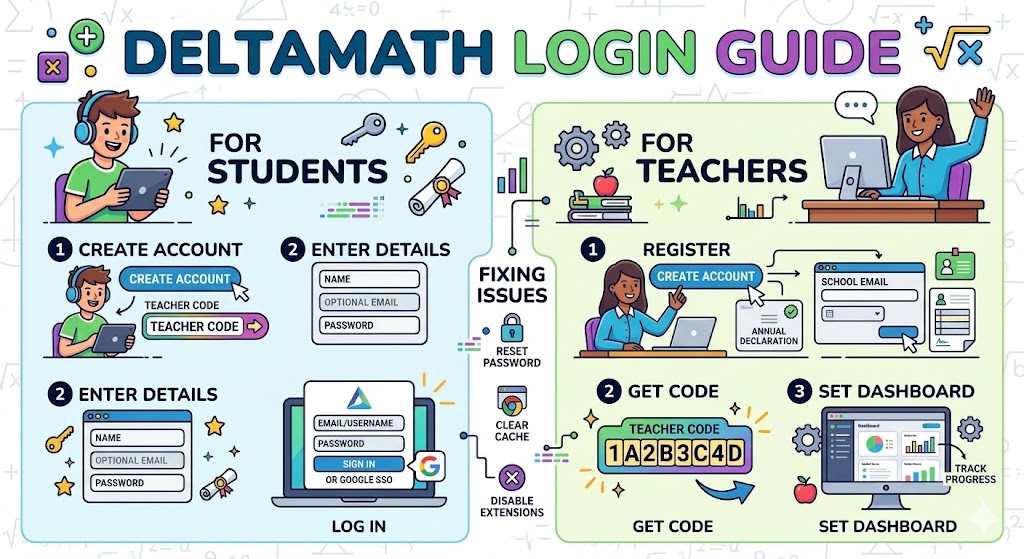
The sign-in process differs depending on account type. Students do not always need an email address to access their work. Teachers register with a school email and receive a unique teacher code that students use during initial setup.
| Account Type | Sign-In Method | What You Need |
|---|---|---|
| Student (new) | Register with teacher code | Code from your teacher, your name, optional email |
| Student (returning) | Email/username + password, or Google SSO | Credentials set at registration |
| Teacher | Email + password, or Google SSO | School email, school declaration (required annually) |
Student DeltaMath Sign In: Step-by-Step
First-time students register rather than log in directly. After setup, returning to the platform follows a straightforward path.
- Go to deltamath.com and click Create Account, then select Student.
- Enter the teacher code your instructor shared with the class.
- Fill in your name, email (if required by your teacher), and create a password.
- Confirm your account via email if prompted, then click the DeltaMath login button on future visits.
- Use the same method — email/password or Google — each time you sign in.
Students who use Google Classroom may sign in directly through Google SSO without a separate password. The system links your Google account to the class roster automatically. This is similar to how some classroom tools handle session access through shared codes rather than individual credentials.
Teacher Account Registration and Setup
Teachers create an account at deltamath.com using a work email. After registration, the platform asks you to declare your school annually. Skipping this step causes the homepage to appear grayed out. Once declared, you receive a teacher code — an eight-character alphanumeric string — that students use to join your roster. This code does not change unless you reset it manually.
Fixing Common DeltaMath Login Problems
Most sign-in failures come from a small set of causes. The chart below shows the relative frequency of reported issues based on DeltaMath’s own FAQ documentation.
Clearing browser cache and cookies resolves the majority of loading problems. Switching from Chrome to Firefox — or vice versa — often fixes issues tied to browser extensions blocking the sign-in form. If Google SSO appears blocked, a school administrator may need to approve DeltaMath as a third-party app through the Google Workspace console.
Password resets follow a direct path: one failed login attempt surfaces a “Forgot password?” link. A reset email arrives at the registered address within minutes. Teachers can also reset student passwords from the class roster under Tools → Manage Classes and Students. For more structured credential troubleshooting across web platforms, the process typically follows the same cache-clear, extension-disable, and reset-link sequence.
How DeltaMath Shows Answers After Submission
DeltaMath does not show correct answers before a student submits their attempt. The platform requires real engagement first. Once you submit, the correct solution appears alongside a step-by-step explanation tailored to the problem type.
This design serves a specific learning purpose. Reviewing the worked solution after a wrong answer lets students identify exactly where their reasoning diverged. PLUS and INTEGRAL subscribers also get access to short help videos for each topic, which clarify the underlying concept rather than just showing the final answer.
Navigating the DeltaMath Student Dashboard
After completing the DeltaMath login, students land on a personal dashboard showing all active and past assignments. Pending tasks appear at the top with due dates visible. Completed assignments display the score and allow replay for additional practice.
The dashboard is intentionally minimal. Each assignment card shows the topic, due date, number of problems completed, and current score. Clicking an assignment opens the problem set. A built-in graphing calculator handles linear, quadratic, and trigonometric functions directly within problems — no external tool needed.
Teachers see a parallel view with class-level data: completion rates, average scores per assignment, and individual student performance. This data updates as students submit work, which means teachers can identify gaps between sessions rather than waiting for a test.
Study Tips to Get More from DeltaMath Practice
Short, regular sessions outperform last-minute cramming on DeltaMath. Because assignments are graded on accuracy and the platform tracks time spent per question, completing five problems carefully each day builds more durable knowledge than rushing through twenty the night a deadline hits.
When an answer is wrong, read the full explanation before retrying. DeltaMath generates new problem variations each time, so understanding the method — not memorizing a specific answer — is the only route to consistent scores. Teachers who align DeltaMath assignments with the current lesson topic create a direct feedback loop: students practice what was just taught, and errors surface while the lesson is still fresh.
FAQs
How do I access the DeltaMath login page?
Go to deltamath.com and click Login at the top right. Students use their email or username and password, or sign in with Google if the account was created that way.
What is the DeltaMath student sign-in process for first-time users?
Click Create Account, select Student, enter your teacher’s code, fill in your name and optional email, then set a password. Future visits use standard email/password or Google login.
Can students see DeltaMath answers before submitting?
No. DeltaMath only shows the correct answer and explanation after submission. PLUS and INTEGRAL users also get access to help videos explaining the underlying concept.
Why is my DeltaMath login not working?
Clear your browser cache, disable extensions, and check that you’re using the same sign-in method as registration. If using Google SSO, ask your school admin to approve DeltaMath in Google Workspace settings.
Do teachers need to re-register on DeltaMath every year?
No, but teachers must declare their school annually. Without this step, the DeltaMath homepage appears grayed out and some content becomes inaccessible until the declaration is completed.