How To Run A Tiktok Ad In 2026?
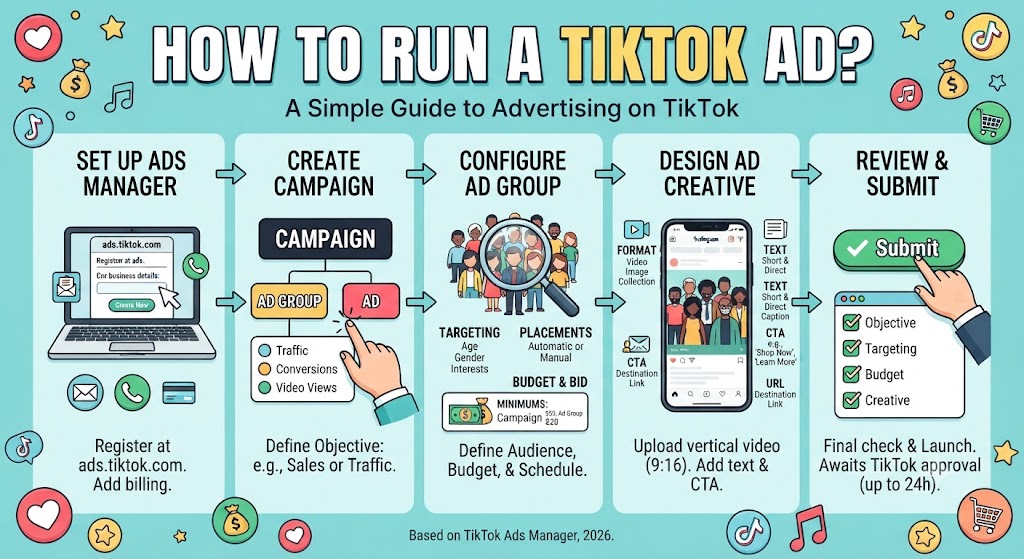
TikTok Ads Manager is where every paid campaign gets built, launched, and tracked. The process works the same whether you’re pushing a product, growing an account, or sending traffic to a website. This guide walks through how to run a TikTok ad in 2026, from account setup to hitting Submit.
Step 1: Create Your TikTok Ads Manager Account
You can’t run anything without an Ads Manager account, so start here.
- Go to ads.tiktok.com
- Click Create Now and register with your email or phone number
- Enter your business name, industry, and billing country
- Verify the account through the confirmation email
- Add a payment method in the billing section
Double-check your time zone during signup. TikTok locks it after registration, and a wrong setting skews every report you’ll ever pull. Paid campaigns also work better when your organic content ranks on its own, which is where TikTok SEO in 2026 comes in as a parallel strategy.
Understanding TikTok Ad Structure: Campaign, Ad Group, Ad
TikTok organizes advertising in three levels. You build from the top down, and each level controls different settings.
| Level | Name | What You Set Here |
|---|---|---|
| Top | Campaign | Objective and overall budget |
| Middle | Ad Group | Audience, placement, schedule, bidding |
| Bottom | Ad | The actual video or image creative |
Every campaign holds at least one ad group. Every ad group holds at least one ad, with a ceiling of 50 ads per group.
How to Run a TikTok Ad: Setting Up the Campaign
- In Ads Manager, click Campaign, then Create
- Pick a campaign objective: traffic, conversions, app installs, video views, reach, or lead generation
- Choose a campaign-level budget or leave spending control at the ad group level
- Name the campaign and click Next
The objective decides how TikTok delivers your ad. A traffic objective finds people likely to click. A video views objective chases watch time. If you sell products on the platform, a conversion objective pairs well with a storefront, and this walkthrough on setting up a TikTok Shop covers that side of the equation.
Configuring the Ad Group: Targeting, Schedule, and Budget
The ad group is where you decide who sees the ad and how much you spend.
For placement, Automatic Placement lets TikTok distribute your ad across TikTok and its partner apps. Manual selection gives you control over exactly where it appears.
| Targeting Type | Options Available |
|---|---|
| Demographics | Age, gender, location, language |
| Interests and behaviors | Content categories users engage with |
| Custom audiences | Customer lists and website visitor retargeting |
| Lookalike audiences | New users similar to existing customers |
Set your start date, then run continuously or pick an end date. Delivery can be limited to specific hours and days.
For budget, enter a daily or lifetime amount, then select CPC, CPM, or CPV bidding based on your objective. TikTok enforces spending floors, shown below.
Source: TikTok Ads Manager enforced budget minimums as reported by Sprout Social, 2026.
Actual click costs vary a lot by vertical, and these TikTok CPC benchmarks by industry show what advertisers paid across sectors this year. Click Next once the ad group is done.
Creating the Ad Creative
This is what users actually see in their feed.
- Name the ad
- Choose the format: single video, image, or collection
- Upload your file or pull a video from your TikTok account
- Write short, direct ad text
- Add the destination URL or app store link
- Pick a call-to-action button such as Learn More, Shop Now, or Download
- Check the in-feed preview on the right
TikTok recommends vertical 9:16 video between 9 and 15 seconds with sound on. Getting the frame right matters, so review the correct TikTok video dimensions before exporting. Ads that feel like regular TikToks outperform polished commercials, a principle covered in more depth in these tips for gaming creators on TikTok.
Reviewing and Submitting Your TikTok Ad
Run through each level before launch:
- Campaign objective matches your goal
- Targeting reaches the right people
- Budget and schedule are set as intended
- Creative is uploaded and the CTA links to the correct destination
Click Submit. TikTok reviews every ad before it goes live. Approval usually takes a few hours, though it can stretch to 24. Once approved, delivery starts and performance shows up under the Campaign tab in your dashboard.
If ad spend is part of a wider creator business, it helps to plan it against income. The TikTok money calculator estimates what accounts earn at different follower levels, and this breakdown of financial strategies for 2026 connects budgeting decisions to longer-term planning.
FAQs
How much does it cost to run a TikTok ad?
TikTok enforces a minimum daily budget of $50 at the campaign level and $20 at the ad group level. Actual costs vary by industry, audience demand, and your bidding method (CPC, CPM, or CPV).
How long does TikTok ad approval take?
TikTok reviews every submitted ad before delivery. Approval typically takes a few hours, though it can take up to 24 hours. You can check the status inside your TikTok Ads Manager dashboard.
What video format works best for TikTok ads?
TikTok recommends vertical video at a 9:16 aspect ratio, between 9 and 15 seconds long, with sound enabled. Ads that resemble organic TikTok content generally outperform polished, traditional commercials.
Can I run TikTok ads without a TikTok account?
Yes. TikTok Ads Manager works independently of a personal TikTok account. You register at ads.tiktok.com with an email or phone number, add billing details, and upload creative files directly.
What campaign objective should beginners choose?
Match the objective to the action you want. Choose traffic for website clicks, conversions for sales, and video views for watch time. TikTok optimizes delivery based on the objective you select.